
Streamers · Formats · Music
Playing live music on Twitch: how to get chat involved
A live music stream lives between songs as much as during them. Keep a visible request list, play your covers yourself (Twitch allows covers performed live, not karaoke over a backing track), talk to chat while you tune and give an encore when chat asks for one. In OBS, keep your voice and your instrument separate, and never put a noise filter on your guitar. A LiveGotchi creature on your overlay becomes your front row: some react to the word "encore", and it dances when chat applauds in a burst.
- Chat's song requests keep people around: everyone waits for their song.
- On Twitch, a cover performed live is allowed if you create all the audio yourself; karaoke over a recording isn't, unless you're licensed.
- Tuning is dead air, unless you turn it into a chat moment.
- An encore ritual ("encore!") ends every show on a high.
- A creature on your overlay reacts to the audience while your hands are busy.
What keeps chat alive on a live music stream?
While you're playing, you're not reading chat. That's normal: a song takes all your attention. Chat, meanwhile, keeps going. It reacts to a chord, quotes the lyrics, asks for the next one. Your job is to give it something to do while you play, then answer it between songs.
Music streams that work almost all have one thing in common: the audience helps set the programme. It picks songs, suggests themes, votes for the closer. Everyone has a reason to stay until their turn, and a reason to come back next week.
Can you play covers live on Twitch?
Yes, with conditions. Twitch's music guidelines allow a cover of someone else's song if you perform it live, create all the audio elements yourself and make a good-faith effort to play it as written. Karaoke, meaning singing over a recording or an instrumental track, isn't allowed unless you're licensed to share that music.
In practice: your guitar, your piano and your voice, yes. A downloaded copyrighted backing track, no. Your own songs, of course, raise no issue at all, and they give chat something it won't find anywhere else.
Which rituals get chat involved?
How do you handle song requests?
Post your song list on a channel panel or a song list page, and take requests through a command run by your bot. Show the queue on screen: everyone sees their turn coming. Many musicians also offer a priority request to subscribers, or make it a channel points reward.
How do you make tuning breaks lively?
Tuning is your best chat moment. Instead of an awkward silence, tell the story behind the next song, read messages or ask "how did you first hear this one?". If tuning drags on, switch scenes and mute the instrument on stream.
How do you bring chat into songwriting?
Live songwriting sessions are a format of their own: chat suggests a theme, votes on a key, offers a word for the chorus. The finished song belongs a little to everyone, and the people who helped come back to hear it done.
Which ritual ends the show?
Always keep an encore in your pocket. Announce "last song", let chat call for "encore", then play something it picks. Wrap up with a thank-you to the day's subs and a raid to another musician: music streamers often send their audiences to each other this way.
Which mistakes make chat drift away from a musician?
- Playing song after song without looking up. Three songs without a word, and chat feels like it's watching a recording.
- Letting the guitar drown the vocals. People want to hear the lyrics: set your levels before the stream, not during it.
- Singing over a copyrighted track. That's the karaoke rule, and it applies even to "just one chorus".
- Forgetting a request. A queue on screen keeps viewers from waiting for nothing.
- Tuning off-mic without warning. The audience hears silence and thinks the stream has dropped.
What are the best OBS settings for playing live?
- One source per signal: your vocal mic on one side, the instrument on the other (through an audio interface, a jack input or a second mic), so you can set their levels independently.
- No Noise Suppression on the instrument: that filter is built for speech and chews up sustained notes. Keep it, lightly, on the mic only if your room is noisy.
- A light Compressor on your voice, and a Limiter on the whole mix, so loud passages don't clip.
- Audio bitrate: under Settings ▸ Output, raise it if your connection allows, as Twitch's music guidance suggests.
- A camera on your hands: a second angle on the neck or the keys, in a scene you alternate with your front shot.
- The request queue and the current lyrics as Text sources, and the LiveGotchi overlay as a browser source, set up by the free OBS script.
What about a creature on your overlay?
LiveGotchi puts a small pixel art creature on your OBS overlay. It reacts to chat, only grows while you're live, and evolves based on what your community does. During a show, it becomes the front row: it reacts to the audience while your hands are busy.
What it does during a music stream, with the default settings:
- When chat applauds in a burst (four emote-heavy messages, or messages repeating the same word, like "encore encore", within ten seconds), it gets excited and dances.
- Words and emojis chosen by its creator make it play an emotion for eight seconds. The same one can't replay within twenty seconds, and six at most fire per minute: no flickering during the ovation.
- A song request by command (any message starting with "!") makes it jump, at most once every five seconds.
- A raid makes it dance, a sub makes it fall in love, a follow makes it jump for joy.
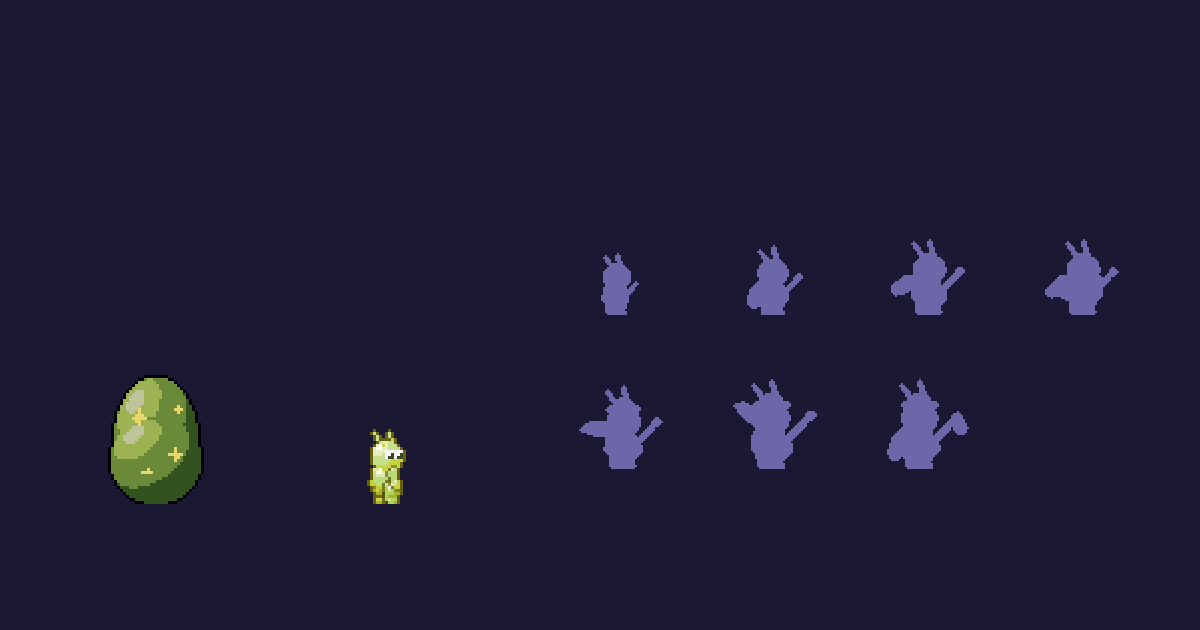
Cricri, by Mossy404, comes from the Music series devoted to acoustic music: a guitarist cricket of summer evenings, water flask in hand at first, whose chords carry the campfire session to the end of the night. Its triggers include 🎸, 🎵, 👏 and the word "encore": your encore ritual finally has someone watching on screen. Which emotion it triggers, you'll find out at your first show.
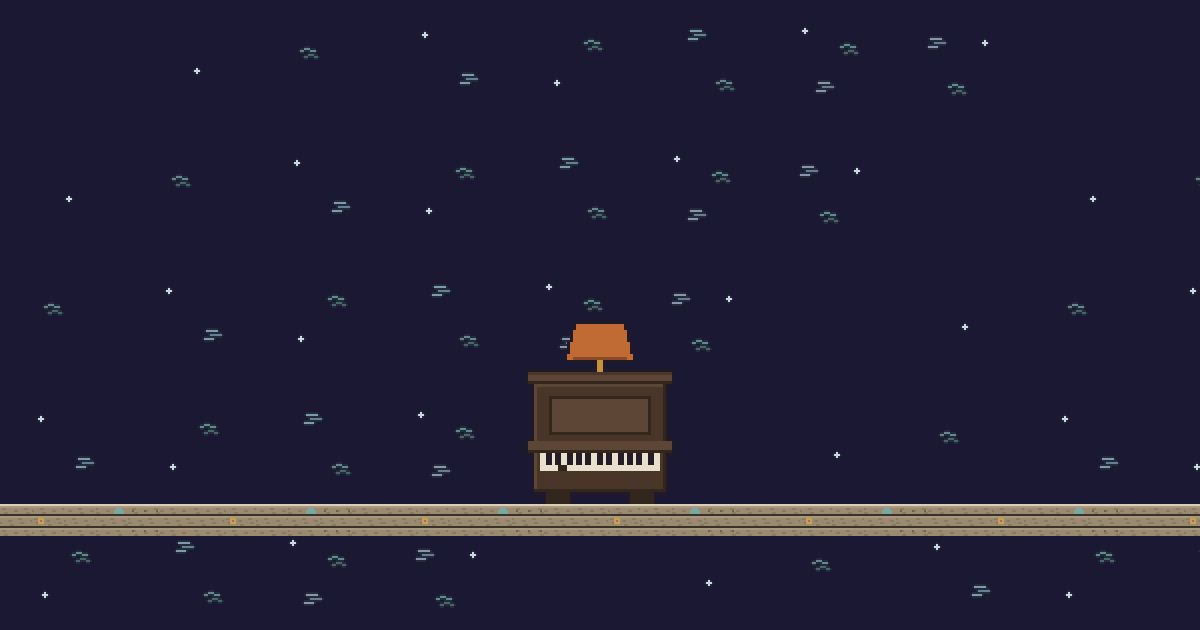
Bastringue, by Passeur9, is a decor item for pianists: the upright piano of a dockside bar, whose lid lifts and hammers pound when a raid arrives. In the same jazz series, Pavane is a singing mist clinging to its mic stand, which reacts to "bravo" among others. And for fireside nights, Tison, by Mossy404, flares up with every new follow.
Mossy404 and Passeur9 are pen names of the LiveGotchi studio, which drew the launch collection and its Music series. The other styles (bard, kawaii pop, gothic organ, orchestra) are in the directory. If your instrument is a pair of decks, read the DJ streaming guide instead.
Frequently asked questions
Can you sing covers live on Twitch?
Yes, if you perform them live, create all the audio yourself and make a good-faith effort to play them as written. Singing over a copyrighted recording or karaoke track isn't allowed unless you're licensed.
How do you manage song requests on Twitch?
Post your song list, take requests through a bot command or channel points, and show the queue on screen. Giving subscribers a priority request is common practice.
How do you connect a guitar or piano to OBS?
Through an audio interface, which gives you one source per input, or with a mic placed in front of the instrument. Keep voice and instrument on two separate sources, and avoid the noise suppression filter on the instrument.
Does the LiveGotchi creature react to my music?
No, it doesn't listen to what you play. It reacts to chat messages, emotes and words, and to stream events: follows, subs, raids.
Which creature fits an acoustic stream?
Look at the Music series in the directory: Cricri for fireside guitar, Tangue and Pavane for jazz, Lambin and its gourd for bossa. Each page lists the words and emojis that wake them up.